
Description
╰┈➤ 𝐖𝐡𝐚𝐭’𝐬 𝐈𝐧𝐬𝐢𝐝𝐞?
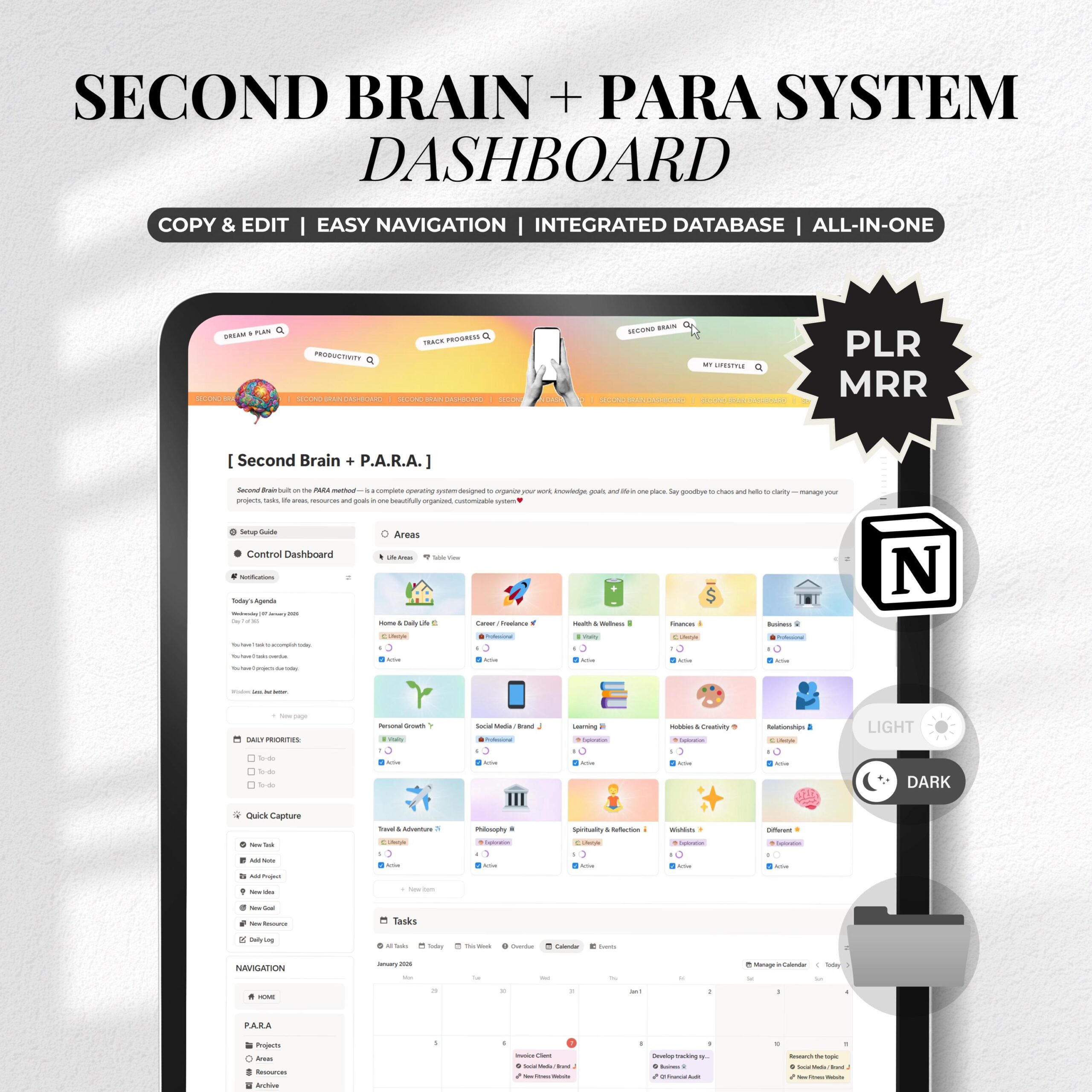
Our “Elite” version goes deeper than any other template. It features a nested architecture—databases and tables inside databases and tables—ensuring every piece of data has a logical home.
✔ Automated Notification Center: A bold, aesthetic widget that tracks the Date, Weekly Momentum, and Yearly Progress in real-time.
✔ The P.A.R.A. Engine: Dedicated hubs for Projects, Areas, Resources, and Archives.
✔ Life Area Mastery: 15+ pre-configured areas (Health, Career, Finance, Spirituality, etc.) with integrated content.
✔ Quick Capture System: Lightning-fast entries for tasks, notes, and ideas so you never lose a “spark.”
✔ Advanced Habits & Routines: A visual tracking system with automated progress bars.
✔ Integrated Knowledge Hub: A sophisticated “Reading List” and “Media Library” to organize everything you consume.
✔ The Thinking Lab: Pre-filled with decision-making frameworks (80/20, Thinking Prompts etc.).
Minimalistic Look Version: https://www.etsy.com/listing/4437263783/minimalist-second-brain-notion-planner
╰┈➤ 𝐖𝐡𝐲 𝐏.𝐀.𝐑.𝐀.?
The P.A.R.A. method is the gold standard for personal knowledge management. It categorizes information based on actionability:
– Projects: Short-term efforts with a finish line.
– Areas: Ongoing responsibilities (Long-term).
– Resources: Topics you are interested in (Library).
– Archives: Completed items (Cold storage).
By using this structure, you solve the “Digital Hoarding” problem. You no longer search for files; your system brings the right information to you exactly when you need it for a project.
 𝐖𝐡𝐨 𝐢𝐬 𝐭𝐡𝐢𝐬 𝐩𝐞𝐫𝐟𝐞𝐜𝐭 𝐟𝐨𝐫?
1) High-Achievers & Entrepreneurs: Who need a “CEO-level” overview of their entire business and personal life.
Students & Lifelong Learners: Who want to turn information into a permanent knowledge asset.
2) Minimalists: Who appreciate a clean, bold, and aesthetic UI that doesn’t feel cluttered.
3) Notion Power Users: Who want a system that is already pre-filled, optimized, and ready to launch.
╰┈➤ How to Use & Duplicate:
1. Open the template link from the PDF you will receive after payment
2. Click “Duplicate” (top right)
3. Add it to your Notion workspace
4. Customize it to your liking
5. Start using — or resell it (Offer PLR or MRR rights to your customers!)
Works perfectly with Notion Free.
╰┈➤ How to Publish & Share Your Notion Template:
▸ Open your Notion template and click the three-dot icon in the top-right corner.
▸ Click ‘Publish’ to activate public sharing.
▸ Go to ‘Site customization’ to access sharing options.
▸ Under ‘Header’, toggle on ‘Duplicate as template’.
▸ Copy your link and start sharing or selling your template!
╰┈➤ Licensing Terms:
・ PLR: Edit, rebrand, and resell as your own.
・ MRR: Resell the product with its resell rights for maximum profit.
・ No Cancellations or Refunds: Due to the digital nature, we cannot offer refunds or exchanges. For any issues, please contact us.
╰┈➤ Visit our Store for more:
https://digitalprostoreua.etsy.com
╰┈➤ Have questions? Feel free to ask! ✉︎
Thank you for visiting DigitalProStoreUA!
© 2024 DigitalProStoreUA, All rights reserved.
________________________________________________
Notion Second Brain, PARA Method Dashboard, Life Organizer Template, Digital Planner 2026, Aesthetic Notion Template, All in One Life OS, Professional Productivity System, Notion Control Center, Personal Knowledge Management, Minimalist Dashboard, Project Management Notion, Goal Tracker Template, Habit Tracker Notion, Notion Specialist Build, Executive Life Planner, Knowledge Hub Template, Decision Making Tools, Notion for Entrepreneurs, Advanced Database Template, Ultimate Life OS
Reviews
There are no reviews yet.